
SmartStove: Voice-Based Cooking Interface
A hands-free, voice-controlled cooking system designed to support real-world, high-attention kitchen tasks.
* Completed as part of a solo academic UX prototyping project.
Year
2025
Role:
UX Designer, Interaction Designer
Tools & Methods:
Physical Prototyping, Storyboarding, Interface Sketching, Voice Interaction Design
The Problem
Cooking is a physically demanding, high-risk activity where users’ hands are frequently occupied, messy, or unsafe to use on touchscreens. Traditional cooking apps and smart devices require visual attention and physical interaction—both of which increase friction, distraction, and safety risk in the kitchen.
Design Challenge:
How might we enable users to cook safely, efficiently, and confidently without relying on touch-based controls?
The User & Context
SmartStove is designed for home cooks who frequently multitask and value speed, safety, and clarity while preparing meals.
These users:
Cook with messy or occupied hands
Rely on visual and timing cues
Need quick, interruption-resistant guidance
Want to reduce cognitive and physical strain
Core user goal:
“I want to follow a recipe, control heat, and manage timing without ever touching a screen.”
Design Process
SmartStove followed a multi-modal prototyping approach focused on embodied and voice-first interaction design:
Built a physical low-fidelity stove prototype
Developed an end-to-end storyboard for voice interaction
Created interface screen sketches for visual hierarchy
Tested safety, timing, and fallback controls
Planned future Wizard-of-Oz and video prototyping
These constraints required every design decision to be high-impact and intentional, with a strong emphasis on layout clarity, inclusive interaction design, and efficient browsing behavior.
Early Concept Development & Storyboards
Before moving into wireframes, we developed storyboards to map the end-to-end experience across the three primary roles within the StyleSource ecosystem: the Shopper, the Professional Fashion Advisor, and the Professional Buyer. These early sketches helped validate the full system workflow and clarified how users would move through each phase of the experience.
Shopper Storyboard
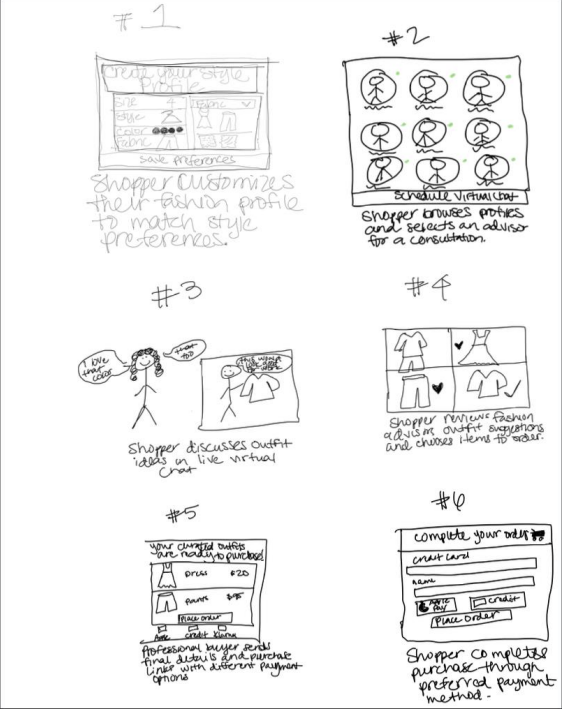
The shopper completes a style profile, connects with a fashion advisor, and reviews curated outfit concepts.
Buyer Storyboard
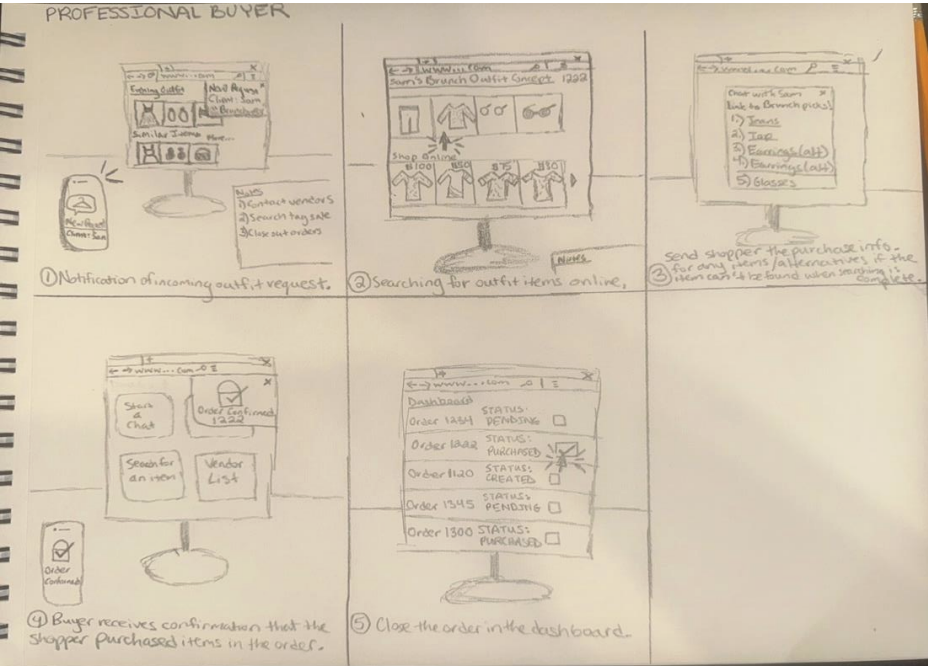
The professional buyer sources items using vendor relationships and AI-enabled tools, generating shoppable links for checkout.
Fashion Advisor Storyboard
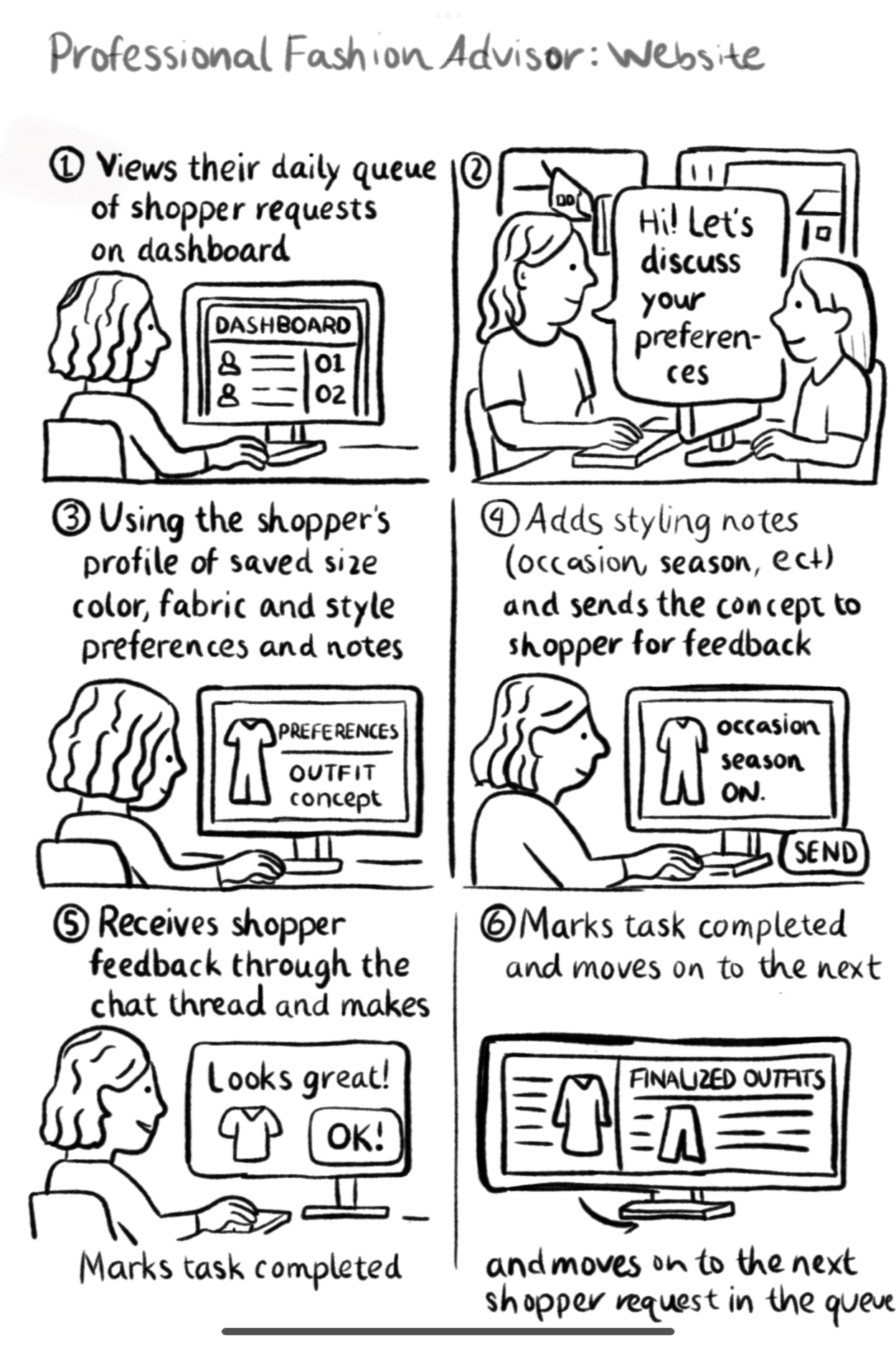
The fashion advisor reviews shopper preferences, develops outfit concepts, and communicates recommendations.
From Storyboards to Wireframes
With the end-to-end system validated through storyboards, we transitioned into low-fidelity wireframes to define layout structure, user flow sequencing, and interaction hierarchy. This phase focused on translating conceptual workflows into tangible interface foundations.
Due to project scope and timeline constraints, wireframing focused on the two most critical touchpoints within the StyleSource experience: the shopper onboarding flow and the fashion advisor discovery and scheduling flow.
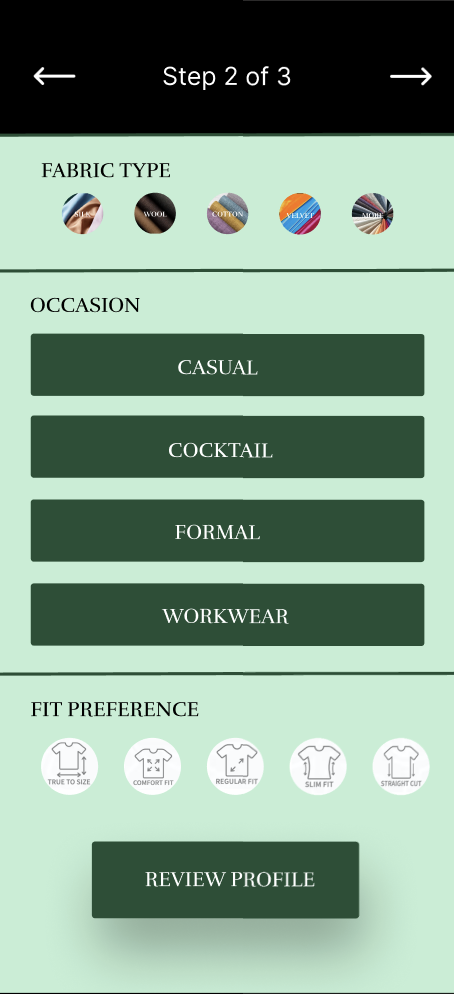
Shopper Wireframe
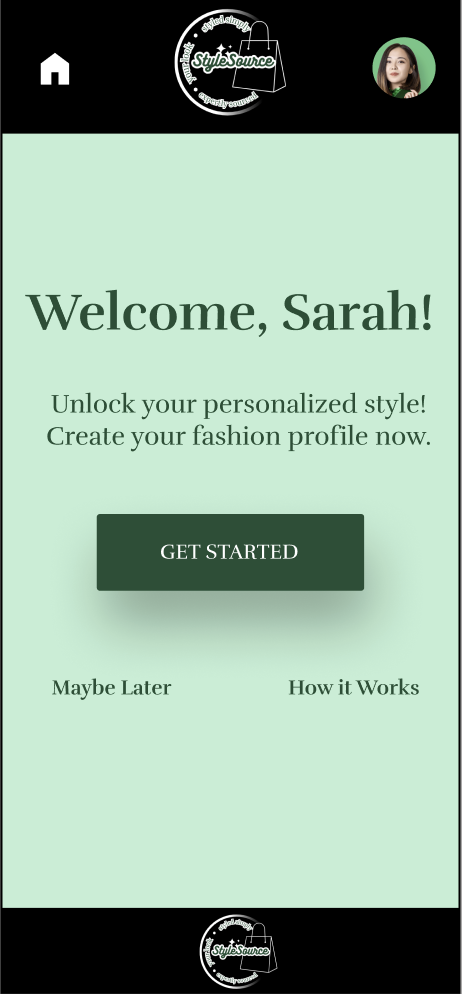
Landing Page
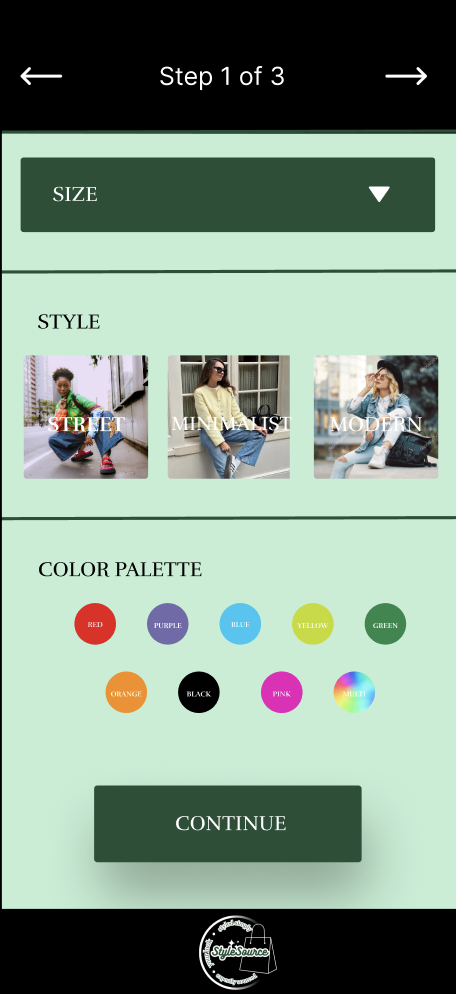
Style Preference Step 1
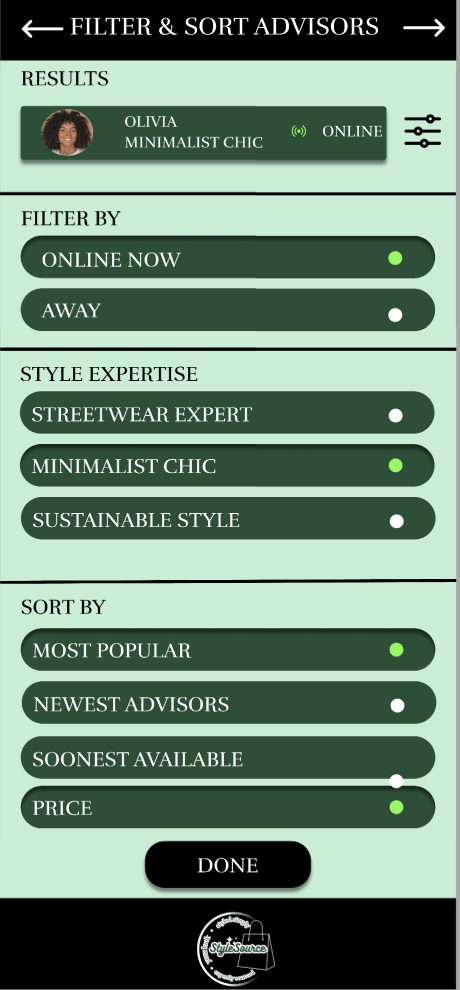
Advisor Wireframe
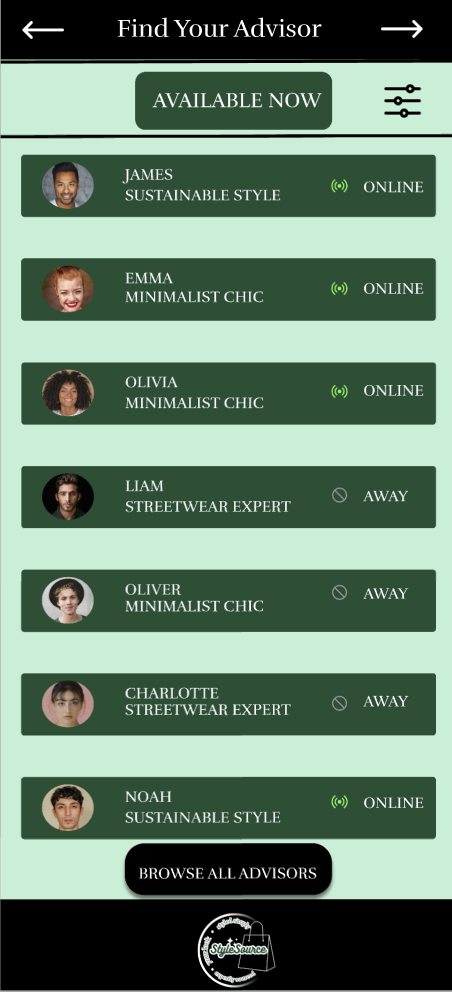
Advisor List View
Filter & Sort
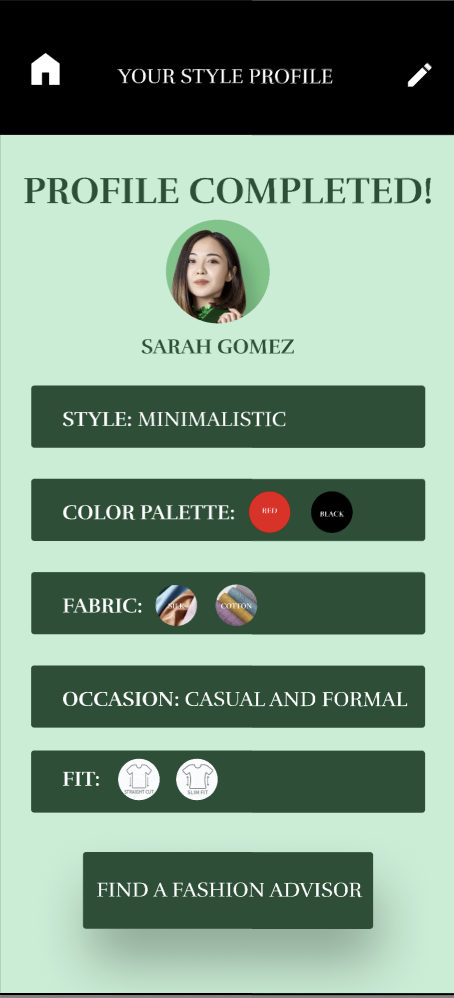
Style Preference Step 2
Profile Confirmation
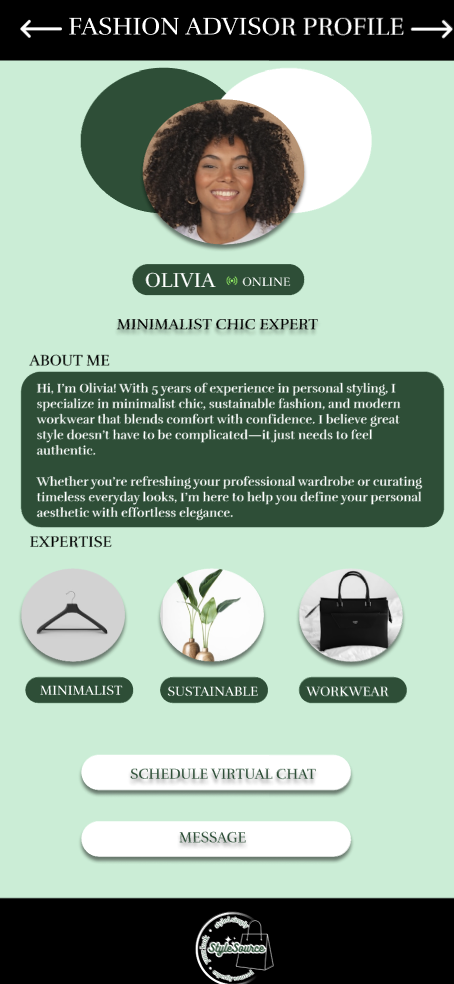
Advisor Profile
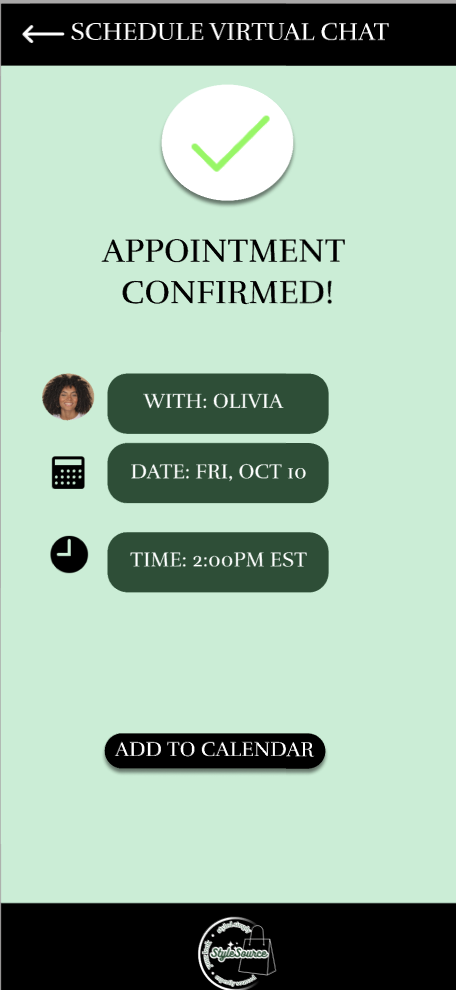
Appointment Confirmation
User Feedback & Iteration
Testing Setup
To evaluate the clarity and usability of the StyleSource concept, we conducted walkthrough sessions with two potential users who regularly shop online and use personalized shopping platforms such as Stitch Fix and Pinterest. These sessions focused on understanding how clearly the experience communicated its purpose and how intuitive the overall flow felt.
What Worked
Both participants responded positively to the three-step profile creation flow, noting that the structure felt organized and approachable. The inclusion of visual elements such as color swatches and style imagery was described as aesthetically pleasing and motivating, helping the experience feel creative rather than form-heavy.
What Needed Improvement
Users identified opportunities for improvement, including requests for a visible progress tracker, a save-for-later option, and tooltips to clarify subjective style terms such as “minimal.” These insights highlighted the importance of flexibility and guidance for users with different levels of shopping confidence.
Advisor Flow Feedback
During evaluation of the fashion advisor discovery and scheduling flow, users appreciated the advisor cards and availability indicators. Suggested improvements included adding a “Style Match” ranking, a “Soonest Available” filter, and time zone auto-adjustment to further streamline the booking experience.
Impact Summary
Overall, user feedback confirmed that the StyleSource experience successfully balanced personalization with simplicity, while also providing clear direction for refinement prior to high-fidelity design.
Final Prototype Walkthrough
The final StyleSource prototype brings together the shopper onboarding experience and the fashion advisor discovery and scheduling flow into a cohesive, interactive system. I led the interaction design for the onboarding flow and advisor discovery experience, focusing on usability, accessibility, and visual hierarchy. This walkthrough demonstrates how users move from defining personal style preferences to booking a virtual styling session, highlighting the system’s end-to-end logic, interaction design, and visual direction.